
Service Design Patterns: From Objects to Web Services | What Are Web Services? | InformIT
Java Version History
Java Version History
Thought to share some of the old Java version released
New features in Java SE 7
Code named Dolphin and released on July 28, 2011.
- Strings in switch Statement
- Type Inference for Generic Instance Creation
- Multiple Exception Handling
- Support for Dynamic Languages
- Try with Resources
- Java nio Package
- Binary Literals, underscore in literals
- Diamond Syntax
New features in Java SE 6
Code named Mustang and released on December 11, 2006
- Scripting Language Support
- JDBC 4.0 API
- Java Compiler API
- Pluggable Annotations
- Native PKI, Java GSS, Kerberos and LDAP support.
- Integrated Web Services.
- Lot more enhancements.
New features in J2SE 5.0
Code named Tiger and released on September 30, 2004.
- Generics
- Enhanced for Loop
- Autoboxing/Unboxing
- Typesafe Enums
- Varargs
- Static Import
- Metadata (Annotations)
- Instrumentation
New features in J2SE 1.4
Code named Merlin and released on February 6, 2002 (first release under JCP)
- XML Processing
- Java Print Service
- Logging API
- Java Web Start
- JDBC 3.0 API
- Assertions
- Preferences API
- Chained Exception
- IPv6 Support
- Regular Expressions
- Image I/O API
New features in J2SE 1.3
Code named Kestrel and released on May 8, 2000.
- Java Sound
- Jar Indexing
- A huge list of enhancements in almost all the java area.
New features in J2SE 1.2
Code named Playground and released on December 8, 1998.
- Collections framework.
- Java String memory map for constants.
- Just In Time (JIT) compiler.
- Jar Signer for signing Java ARchive (JAR) files.
- Policy Tool for granting access to system resources.
- Java Foundation Classes (JFC) which consists of Swing 1.0, Drag and Drop, and Java 2D class libraries.
- Java Plug-in
- Scrollable result sets, BLOB, CLOB, batch update, user-defined types in JDBC.
- Audio support in Applets.
New features in JDK 1.1
- JDBC (Java Database Connectivity)
- Inner Classes
- Java Beans
- RMI (Remote Method Invocation)
- Reflection (introspection only)
JDK Version 1.0
Codenamed Oak and released on January 23, 1996.
Wishing you a happy new year!
Oracle Service Registry
Oracle Service Registry provides a ‘DNS’-like reference for SOA. A fully compliant UDDI v3 registry, Oracle Service Registry provides a standards-based interface for SOA runtime infrastructure to dynamically discover and bind to deployed service end points. As part of the Oracle SOA Governance solution, Oracle Service Registry bridges the gap between the design time and runtime environments through automated synchronization with Oracle Enterprise Repository and Oracle SOA Suite
Comprehensive UDDI v3 compliance—Provides a standards-based mechanism for dynamic discovery of services and their associated policies during runtime
SOA agility—Keeps SOA infrastructure up-to-date with changes to service end points, ensuring your SOA doesn’t break
End-to-end SOA Lifecycle Management—Serves as the UDDI interface to Oracle Enterprise Repository for support of end-to-end management of the SOA lifecycle
Hot-pluggable—Supports heterogeneous services from any vendor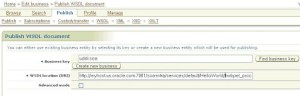



Comprehensive UDDI v3 compliance—Provides a standards-based mechanism for dynamic discovery of services and their associated policies during runtime
SOA agility—Keeps SOA infrastructure up-to-date with changes to service end points, ensuring your SOA doesn’t break
End-to-end SOA Lifecycle Management—Serves as the UDDI interface to Oracle Enterprise Repository for support of end-to-end management of the SOA lifecycle
Hot-pluggable—Supports heterogeneous services from any vendor
You can use Oracle SOA Suite with the following versions of OSR:
- OSR 10.3 (with Oracle WebLogic Server 10.3)
- OSR 11g
This section describes how to integrate Oracle Service Registry with Oracle SOA Suite 11g. It contains the following topics:
1. Integrating with Oracle JDeveloper
To create a connection between the Oracle Service Registry and JDeveloper:
- Go to Oracle JDeveloper.
- Select File > New > Connections > UDDI Registry Connection to create a UDDI connection.
- Enter a connection name.
- Enter an inquiry endpoint URL. For example: http://myhost.us.oracle.com:7001/registry/uddi/inquiry
- Ensure that the Business View option is selected.
- Click Next.
- Click Test Connection.
- If successful, click Finish. Otherwise, click the Back button and correct your errors.
2. Configuring Oracle Service Registry at Runtime
Oracle SOA Suite uses the SCA standard as a way to assemble service components into a SOA composite application. SCA provides a programming model for the following:
- Creating service components written with a wide range of technologies, including programming languages such as Java, BPEL, C++, and declarative languages such as XSLT. The use of specific programming languages and technologies (including web services) is not required with SCA.
- Assembling the service components into a SOA composite application. In the SCA environment, service components are the building blocks of applications.
- SCA provides a model for assembling distributed groups of service components into an application, enabling you to describe the details of a service and how services and service components interact. Composites are used to group service components and wires are used to connect service components. SCA helps to remove middleware concerns from the programming code by applying infrastructure declaratively to composites, including security and transactions.
- The key benefits of SCA include the following:
- Loose coupling: Service components integrate with other service components without needing to know how other service components are implemented.
- Flexibility
- Service components can easily be replaced by other service components.
- Services Invocation
- Services can be invoked either synchronously or asynchronously.
- Productivity: Service components are easily integrated to form a SOA composite application.
- Easy Maintenance and Debugging: Service components can be easily maintained and debugged when an issue is encountered.
The Oracle Service Registry (OSR) provides a common standard for publishing and discovering information about web services. This section describes how to configure OSR against a separately installed Oracle SOA Suite environment:
3. Publishing and Browsing the Oracle Service Registry
This section provides an overview of how to publish a business service. For specific instructions, see the documentation at the following URL:
To Manually Publish a Business Service
- Go to the Registry Control: http://hostname:port/registry/uddi/web
- Click Publish > WSDL.
- Log in when prompted.
- Complete the fields on this page to specify the access point URL and publish the WSDL for the business service. The following screen provides details.
If you later change your endpoint location, you must also update the WSDL location in the Registry Control. Otherwise, UDDI invocation fails during runtime. To change the WSDL location:
· Log in to the Registry Control.
· Navigate to the service.
· Change both URLs within the port type and binding information using the model key
To configure a SOA project to invoke a service from the registry:
· Open the SOA project in which to create a reference to the business service.
· Drag a Web Service icon into the External Services swimlane. The Create Web Service dialog appears.
· To the right of the WSDL URL field, click the icon to select a WSDL.
· From the list at the top, select Resource Palette.
· Expand the navigational tree.
· Expand UDDI Registry > Business Services.
· Select the published business service, and click OK. The following screen provides details.
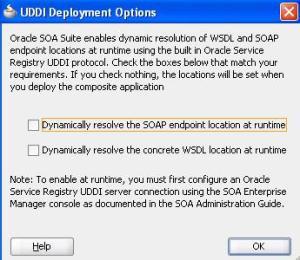
5. UDDI Deployment Options dialog.
- Select one of the following deployment options:
- Dynamically resolve the SOAP endpoint location at runtime.
- Dynamically resolve the concrete WSDL location at runtime.
- The following screen provides details.
- Click OK. You are returned to the Create Web Service dialog.
- See the following section based on your selection in the UDDI Deployment Options dialog.
- Complete the remaining fields in the Create Web Service dialog, and click OK. The Create Web Service dialog looks as shown in the following screen.
- Verify the wiring of the reference with the appropriate service component.
- Complete the remaining fields in the Create Web Service dialog, and click OK. The Create Web Service dialog looks as shown in the following screen.
- Verify the wiring of the reference with the appropriate service component.
You can set the inquiry URL, UDDI service key, and endpoint address during runtime in Oracle Enterprise Manager Fusion Middleware Control Console.
To configure the inquiry URL, service key, and endpoint reference for runtime:
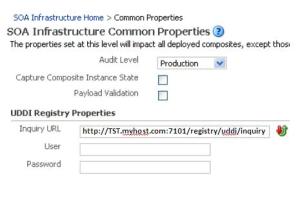
- Log in to Oracle Enterprise Manager Fusion Middleware Control Console and navigate to Common Properties, as shown in the following screen.
- Specify values for the following properties:
- In the SOA Infrastructure Common Properties page, specify the same UDDI inquiry URL in the Inquiry URL text box, as shown in the following screen, that you specified in the Create UDDI Registry Connection wizard. For example, http://TST.myhost.com:7101/registry/uddi/inquiry.
o In the Properties page of the reference binding component, you can change the endpoint reference and service key values created during design time. For information, see section “Configuring Service and Reference Binding Component Properties” of Oracle Fusion Middleware Administrator’s Guide for Oracle SOA Suite.
- Restart the SOA Infrastructure.
- Exit Oracle Enterprise Manager Fusion Middleware Control Console.
- To see endpoint statistics, return to the Registry Control.
- Go to the Manage page and check statistics to see the increase in the number of invocations when not cached (the first time).
Reference:
Is Near field communication (NFC) Future?
Near field communication (NFC) is a set of standards to communicate NFC devices on radio frequency by bringing them into close proximity (usually less than 5 centimeters). Since communication would be based on radio frequency, therefore scope, use cases and security consideration are different from other radio based interface such as Bluetooth.


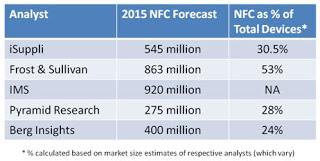
Fig: NFC compare to other communication
It make people’s lives easier by accessing new media and contents services more intuitive, make it easier to pay, easier to share information, and easier to use transport and other public services.
NFC’s bidirectional communication ability is ideal for establishing connections with other technologies by the simplicity of touch. For example if the user wants to connect their mobile device to their stereo to play media, they can simply touch the device to the stereo’s NFC touch point and the devices will negotiate the best wireless technology to use.
What does this mean for the end user? Easy connections, quick transactions, and simple data sharing.
The key initial applications for NFC technology fall into three categories:
• Machine-To-Machine: NFC is used to enable communication between two devices
• Payment & Ticketing: NFC will build on the emerging smart ticketing and electronic payment infrastructures
• Service Initiation: NFC is used to perform service discovery or to ‘unlock’ another service (such as opening another communication link for data transfer).
Machine-To-Machine
NFC could be used to setup local communication between two devices for small amount of information (up to few KB).
e.g. printing photo straight from mobile to printer, sharing photo from mobile to smart TV etc.
Fig: Taking picture and sharing to TV
Fig: Sharing data from mobile to mobile
Payment & Ticketing
Payment & Ticketing was one of the drivers for the creation of NFC standard. NFC-enabled payments are much easier and less costly for the credit card merchant than cash and other traditional payment method. Initially, NFC-enabled devices are likely to be used for low-fraud, limited-value payment situations, such as quick-serve restaurants, kiosks, vending machines and parking meters.
e.g.
Touch&Travel is an NFC-based ticketing pilot project jointly conducted by Deutsche Bahn, the German rail authority, and its partners Vodafone, Deutsche Telekom and O2 Germany, with support from industry as well as local transport companies
The illustration below gives an overview of the Touch&Travel system’s operation.
Forecast
1. 1. Currently close to 50 million NFC enabled handsets are sold across to world which is less than 5% of the handset market. However, the NFC enabled devices are expected to increase at least ten folds over the current level (Refer the forecast below)
2. 2. The forecasts from different analyst firms vary a lot on the NFC device projections but all agree that it would be significant by 2015.

References:
Best Practices – SOA Service Registry
Use the Right Type of Module:
- Think about mediation logic vs. process logic.
- Use Mediation Modules (Oracle ESB) for integration / mediation logic:
- Short-running, minimal choreography.
- Supports header manipulation.
- Use (Integration) Modules (Oracle 11g Suite) for business / process logic:
- Can be long-running, powerful choreography and business logic
Design your System Topology
- Check if need more than one server.
- Use clustering for scalability, For failover etc
- Database selection.
- Need to use a load balancer / HTTP server for failover and scalability.
Spend Time on Interfaces and Business Objects
- Refactoring support is limited inside mediation flows, so good to get this right first time round.
- Adopt a naming convention.
- Add constraints?
- Add modelled faults?
- Think about namespaces.
- Configure default namespace policy before you start.
Consider How you Split up Mediation Modules
- How many mediation flows inside each mediation flow component?
- Large number of modules impacts performance / deployment.
- Small number impacts ease of development.
- Remove unused library content.

Select your Binding Types Carefully
- Often binding type dictated by circumstance.
- But if you have the scope to decide:
- Prefer SCA default/native for inter communications
- Prefer Web Services for synchronous service exposure
- Prefer JMS for asynchronous service exposure
- Sometimes you have alternatives. For example:
- Web Services binding : allows easy access to SOAP headers
- Or
- HTTP with SOAP data binding : allows access to HTTP headers but not SOAP headers
Consider your Custom Coding Strategy
- Custom mediation:
- Most useful for one-off coding.
- Cannot be re-used between modules.
- ‘Visual’ mode available which may be useful to those less comfortable with Java/SDO API.
- Custom primitive (also called roll-your-own primitive):
- A first-class new primitive: same abilities as any other primitive type (XSLT, Endpoint Lookup…).
- Can have customisable properties.
- Appears in palette in WID.
- More re-usable, but more work to create.
Consider your Logging Strategy
- You will want one; consider it before you start developing.
- Options include:
- Message Logger – limited functionality – logs only to a fixed schema database table.
- JDBC or Flat File Adapter (in separate mediation module?)
- Custom mediations logging.
- Custom primitives.
Use Source Control & Do Automated Builds
- Use source control and integrate with IDs
- Only one developer per mediation module at once.
- Automated build direct from source control.
Do Unit Testing
Do the unit testing before check –in
JBOSS BRMS Using JBoss Studio
Initial Setup
Before developing the BRMS rules engine project we need to install BRMS Rule engine and JBoss Developer studio as explained below
Use below link to install the BRMS Rule Engine.
1. Install BRMS Rule
2. Install JBOSS Developer Studio
This section will explain how to create the BRMS rule project using JBoss Developer studio

3. Give the project Name here I given “MetaValidation”

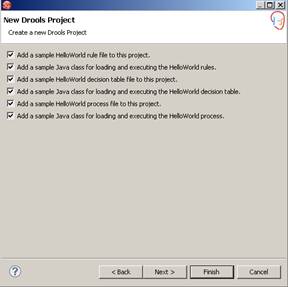
4. Select the entire sample as mentioned in below figure which will be providing you sample code which helps you to understand.
5. Next Screen is to configure Drools Runtime environment
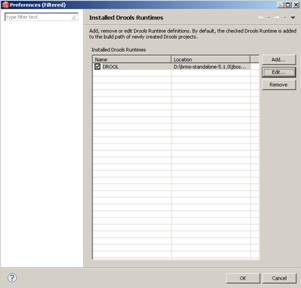
6. Select the below path in Drools Runtime Environment Path section and click OK
<BRMS Standalone home>\jboss-as-web\server\default\deploy\jboss-brms.war\WEB-INF\li
6. Select the below path in Drools Runtime Environment Path section and click OK
<BRMS Standalone home>\jboss-as-web\server\default\deploy\jboss-brms.war\WEB-INF\li


7. Select the new Drools Runtime environment in your project.

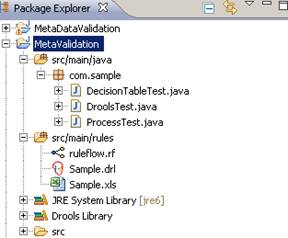
8. After completing you will be getting Drool project as shown below figure. You could also see some sample rule flow, business rules and sample test classes.
New BRMS Rule Creation
In this section I will explain how to create & test the small rules
1. Right click on src/main/rules and select the Rules Resource and click on the Next button
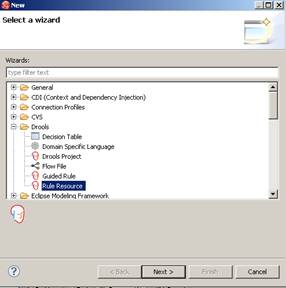
2. Give the Rule Name and package name and click finish which will create new business Rule file with template
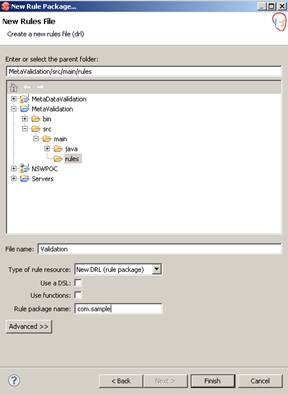
3. Below is the new Rules template file which
package com.sample
rule "Your First Rule"
when
#condition
then
#action
end
rule " Your Second Rule"
#include attribute such as "salience here....
when
#condition
then
#action
end
Every rule will be starting with rule keyword and then name of the rule. Condition will be starting with “when” keyword and then “action” keyword to process the action. We can define the rules group or salience which prioritize the execution of rules which I will explain in my next section.
4. Will create simple rule i.e. length of member of metadata should be 6.
rule "cost Center"
ruleflow-group "group1"
when
m:Metadata(member.length==8)
then
m.setMessage("Cost Center Metadata is Valid");
end
It represents that “Cost Center” rule which belong to rule flow-group “group1” uses the Metadata POJO object which assign into variable m and check the condition if length of member is 8 then show the message that Cost Center Metadata is valid.
m.setMessage(..) can be used to set the message and later can be accessed into Client or Test class.
Small Rule Flow Creation
1. Right click on src/main/rules and select other which will open the new Flow file wizards.
2. Select the “Flow File” and click next which will move to next screen where you can give the Rule flow file name click finish which creates the new Flow File with component bar on left side.
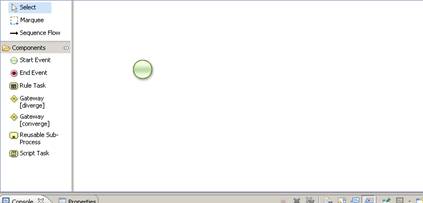
3. Select the Rule task and place into rule drawing pane.
4. Open the Rule flow property and give the name of the Rule task and link it to with rule putting group1 on RuleFlowGroup section. If you remember we have add the rule flow group as group1 which will link rule flow with Cost Center rul.
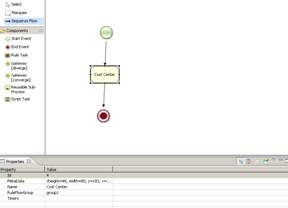
Rule Testing
1. Create new ValidationTest class to test Rules
2. Write the method readKnowledgeBase which is already available in sample or you can use below code as well
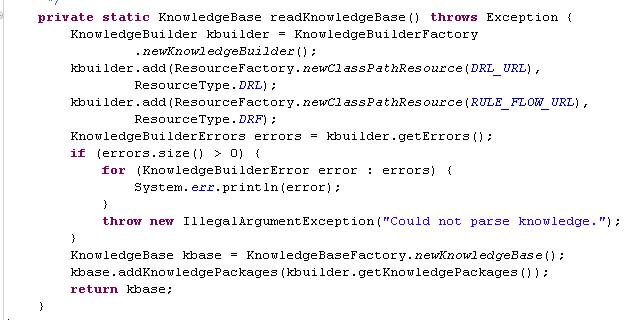
3. Use the below code to write the test client class.
package com.sample;
import org.drools.KnowledgeBase;
import org.drools.KnowledgeBaseFactory;
import org.drools.builder.KnowledgeBuilder;
import org.drools.builder.KnowledgeBuilderError;
import org.drools.builder.KnowledgeBuilderErrors;
import org.drools.builder.KnowledgeBuilderFactory;
import org.drools.builder.ResourceType;
import org.drools.io.ResourceFactory;
import org.drools.logger.KnowledgeRuntimeLogger;
import org.drools.logger.KnowledgeRuntimeLoggerFactory;
import org.drools.runtime.StatefulKnowledgeSession;

public class ValidationTest {

public static final String DRL_URL = "Validation.drl";
 public static final String RULE_FLOW_URL = "ruleflow.rf";
 public static final void main(String[] args) {
 try {
 // load up the knowledge base
 ValidationTest procTest = new ValidationTest();
 Metadata metadata = new Metadata();
 metadata.setMember("FD1111");
 String result = procTest.testRule(metadata);
 } catch (Throwable t) {
 t.printStackTrace();
 }
 }
 public String testRule(Metadata metadata) {
 try {
 // load up the knowledge base
 KnowledgeBase kbase = readKnowledgeBase();
 StatefulKnowledgeSession ksession = kbase
 .newStatefulKnowledgeSession();
 ksession.insert(metadata);
 KnowledgeRuntimeLogger logger = KnowledgeRuntimeLoggerFactory
 .newFileLogger(ksession, "test");
 // start a new process instance
 ksession.startProcess("com.sample.ruleflow");
 ksession.fireAllRules();
 logger.close();
 } catch (Throwable t) {
 t.printStackTrace();
 }
 return metadata.getMessage();
 }
 private static KnowledgeBase readKnowledgeBase() throws Exception {
 KnowledgeBuilder kbuilder = KnowledgeBuilderFactory
 .newKnowledgeBuilder();
 kbuilder.add(ResourceFactory.newClassPathResource(DRL_URL),
 ResourceType.DRL);
 kbuilder.add(ResourceFactory.newClassPathResource(RULE_FLOW_URL),
 ResourceType.DRF);
 KnowledgeBuilderErrors errors = kbuilder.getErrors();
 if (errors.size() > 0) {
 for (KnowledgeBuilderError error : errors) {
 System.err.println(error);
 }
 throw new IllegalArgumentException("Could not parse knowledge.");
 }
 KnowledgeBase kbase = KnowledgeBaseFactory.newKnowledgeBase();
 kbase.addKnowledgePackages(kbuilder.getKnowledgePackages());
 return kbase;
 }
}
4. Right click on the test class and run as Java Application which will provide you output on console
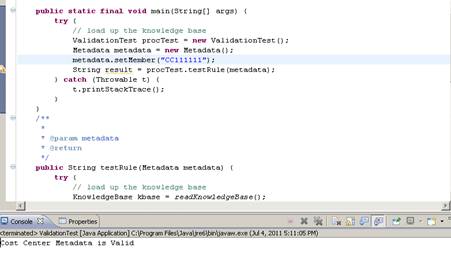
I can assume we have understood how to create the simple BRMS rules and test the same. In this section I would try to explore the complex rules creation. We will also learn how to prioritize & routing of rules using the rules flow. We will also see the proper use of Rule flow group.
Below are the rules which will be implementing using the BRMS
1. If Dimension of Metadata is CC then member length should be 8
2. if Dimension of Metadata is FE then member length should be 6
3. Dimension of Metadata should either be CC or FE
Rule Creation
Below code depicts the different rules have been created to cater the above validation. If you see carefully explored then you will find that I grouped rules in different group’s group1, group2 and group3 . In this way we can instruct to the rules engine to run the group of rules separately.
#created on: Jun 29, 2011
package com.sample
#list any import classes here.
import com.sample.Metadata;
rule "Cost Center"
ruleflow-group "group1"
 when
 m: Metadata (member.length == 8 )
 then
 System.out.println("Cost Center Metadata is Valid");
 m.setMessage("Cost Center Metadata is Valid");
end

rule "Cost Center Invalid"
ruleflow-group "group1"
 when
 m: Metadata (member.length != 8 )
 then
 System.out.println("Cost Center Metadata is Invalid");
 m.setMessage("Cost Center Metadata is Invalid");
end

rule "Fund Entity"
ruleflow-group "group2"
 when
 m: Metadata (member.length == 6)
 then
 System.out.println("Fund Entity Metadata is Valid");
 m.setMessage("Fund Entity Metadata is Valid");
end

rule "Fund Entity Invalid"
ruleflow-group "group2"
 when
 m: Metadata (member.length != 6)
 then
 System.out.println("Fund Entity Metadata is Invalid");
 m.setMessage("Fund Entity Metadata is Invalid");
end

rule "Not Valid"
ruleflow-group "group3"
when
 m: Metadata (eval(true))
 then
 System.out.println("Meta Data Not Valid");
 m.setMessage("Meta Data Not Valid");
 //m.setStatus("FE");
end
Rule Flow Creation
We branched rule in three category i.e. CC, FE & Else. If dimension is CC then executes the CC related rules i.e. group1. if dimension is FE then execute FE related rule i.e. group2. If dimension is neither CC nor FE then execute Else part of the rule i.e. group3.
1. Create the new rule file
2. Select the” Start” & “End” component and add into pane
3. Add the Gateway diverge
4. Add 3 “Rule Task” components in the pane as mentioned in below figures.
5. Add the Gateway Converge as mentioned in the below figure
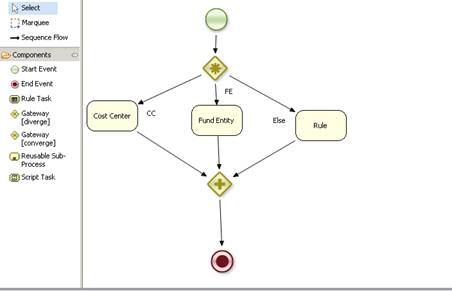
6. Select the Gateway diverge properties and select the Type as “OR”
7. Click on the Constraints which will open “Edit Constraints” window
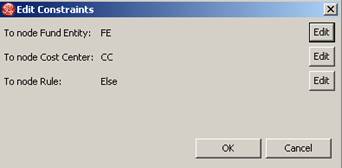
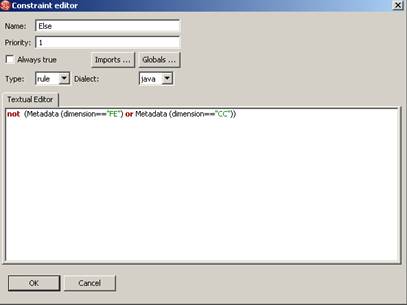
8. Click on First Node Entity enter the name “FE”, Type “rule” and Dialect as “java”
9. Enter the Metadata (dimension=”FE”) in the Textual Editor
10. This would add the routing for FE dimension

11. Similar way Edit the Constraint for CC

12.Similar way Edit the Constraint for Else
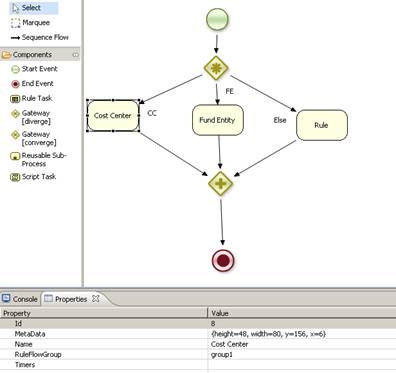
13. Select the Cost Center(CC) Rule Task property enter the name Cost Center and RuleFlowGroup as “group1”
14. In the similar way add the RuleFlowGroup for FE and group2 and Else group
15. Run the application as mentioned in Rule Testing section
 TechMyTalk